

🌎📡 [ begin transmission ] :
Welcome :) You’re reading Be Greater. Thanks for tuning in.
Many of the most popular apps on our phones are built around engagement.
The longer we stay, the more valuable our attention becomes.
Infinite scroll removes the stopping point. Autoplay gives us the next thing before we ask for it. Notifications give us reasons to return. Algorithmic feeds get better at learning what keeps us looking.
Most of us accepted all of this as the default.
Most of us handed our phones access to our attention without thinking about it. We took the device out of the box, turned everything on, installed every popular app, and accepted every default.
Then we developed habits around whatever was easiest to reach.
But you can use these devices differently. You don’t have to accept the default.
My rule is simple: keep anything that helps me create, communicate, navigate, learn, or live better. Put friction between me and anything that mainly wants more of my attention.
Your setup may look completely different from mine. The point is to stop accepting the default.
Here is how I set mine up. (in 2026)
The phone itself
I chose the smallest, most basic current iPhone that Apple sells:
the iPhone 17e — one camera, no “Dynamic Island”, no Camera Control button, and no “ProMotion” display. It still has the decade-old “notch” design at the top (introduced in 2017), and instead of the new faster 120Hz refresh rate screens that many modern smartphones use, this phone confidently rocks the classic 60Hz screen (which iPhones have used from the original 2G in 2007 all the way up until the 16 in 2024.)
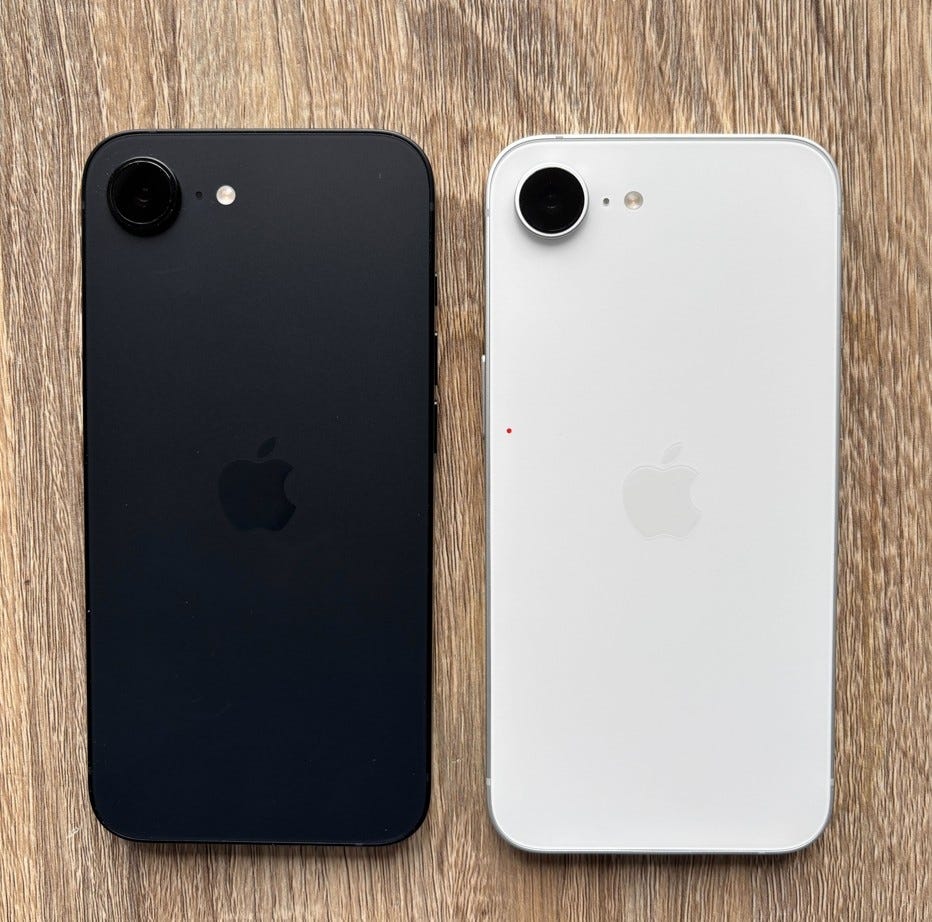
The simplest, smallest, least distracting iPhone* available.
*(Disclaimer: Yes, many brands sell actual dumbphones, but I live in North America where most people already use Apple’s iPhone, so this is a realistic way to reach near-dumbphone status without losing the convenience and capability of the modern smartphone.)
The one place I did not go minimal was storage. I got 512GB specifically so I can download and own my media locally — books, music, movies, my documents and projects — without depending on streaming services, Wi-Fi, or an algorithm deciding what is available. My content. On my device. Available offline.
The goal was a focused phone, not a useless one.
Stop the phone from turning itself on
Many default settings make our phones light up and present themselves constantly, often before we consciously decided to use it.
Your phone turns on when you pick it up. It turns on when you tap the screen. Every glance, every accidental touch pulls you back in before you made a conscious decision to look.
Turn these settings off.
“Raise to Wake” means the screen activates every time you pick up the phone, reach past it, or move it from one surface to another. That is dozens of involuntary invitations to look at your screen every day. Turn it off and the phone stays dark until you press a button on purpose.
“Tap to Wake” works the same way. You accidentally breathe on the screen or your hand brushes the surface and the screen lights up — all of it becomes a trigger. Remove the trigger.
Raise to Wake: Settings → Display & Brightness → Raise to Wake → Off
Tap to Wake: Settings → Accessibility → Touch → Tap to Wake → Off
Small changes. The phone stops summoning you. You go to it when you decide to.
Matte screen protector
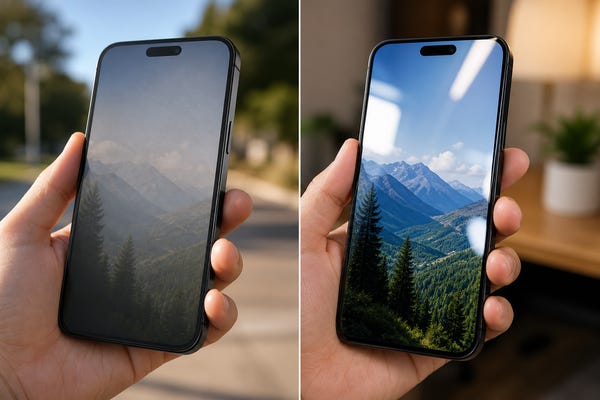
Standard glossy glass smartphone displays are bright, reflective, and visually aggressive. A matte screen protector softens all of that. The screen feels calmer. Reading looks better. The phone becomes less like a glowing object demanding attention and more like a surface you interact with intentionally.
Going back to the glossy reflective glass after using this feels wrong. I’m not going back.
(Apple if you’re reading this: please make an iPhone with an E-ink display)

Link to matte screen protector (for iPhone 17e, 16e, 14, 13)
Grayscale
Color is one of the primary tools apps use to hold your attention. Notification badges are red for a reason. Feeds are visually saturated for a reason. Modern interfaces use color, contrast, badges and imagery to attract attention.
Grayscale removes that layer without breaking anything the phone does. It still works exactly the same. Everything is just less visually appealing or rewarding to open and scroll through. Instead of being drawn to the most colorful thing on the screen, I stay focused on whatever task I am doing in that moment.
Settings → Accessibility → Display & Text Size → Color Filters → Grayscale
Reduce motion
The animations when you open or close an app are small rewards designed to make interaction feel smoother and more satisfying. I reduced them because I wanted the phone to feel less playful and more functional.
Settings → Accessibility → Motion → Reduce Motion → On
Notifications
Turn off almost all of them.
Go through every single app and ask: does this genuinely need immediate access to me? For most apps the answer is no. Sales, social updates, non-breaking news alerts, badges on apps you barely use — none of these are emergencies. They are interruptions dressed as urgency.
Keep notifications for calls, messages from people you need to reply to quickly, calendar reminders, and alarms. Almost everything else can be delivered quietly or tuned off entirely.
Settings → Notifications → go through every app
Block or delete the feeds
This is the most important change.
Social media apps, TikTok, Instagram, YouTube, Reddit — anything with an infinite scroll or a recommendation feed — should be removed from the device or blocked heavily with Screen Time apps or settings.
For example: My web browser makes me type an intentional message and then wait ten seconds before opening a two-minute window of web access. Enough time to quickly look something up or handle something practical, like paying a bill or checking store hours, but not enough time to lose track of what I’m doing and disappear into a random internet rabbit hole.
You can still keep a crucial social media app for work or marketing in the Hidden folder if you need to, but keep it blocked behind layers of friction to prevent mindless habits.
The friction is the point. The difference between opening Instagram intentionally to share or promote something, and just letting your thumb swipe to Instagram out of habit because you had three seconds of boredom is enormous.
I am building the phone around the intentional version.
Settings → Screen Time → App Limits
App-blocker apps: Screen Zen, Jomo, etc.
The home screen
This is where most people are NOT setting themselves up for success.
The home screen is the first thing you see every time you unlock the phone. If it’s full of social apps and entertainment, that is where your attention goes. If it looks like a workspace, that is where your attention goes.
I made my home screen look and function like an eReader, or a planner.
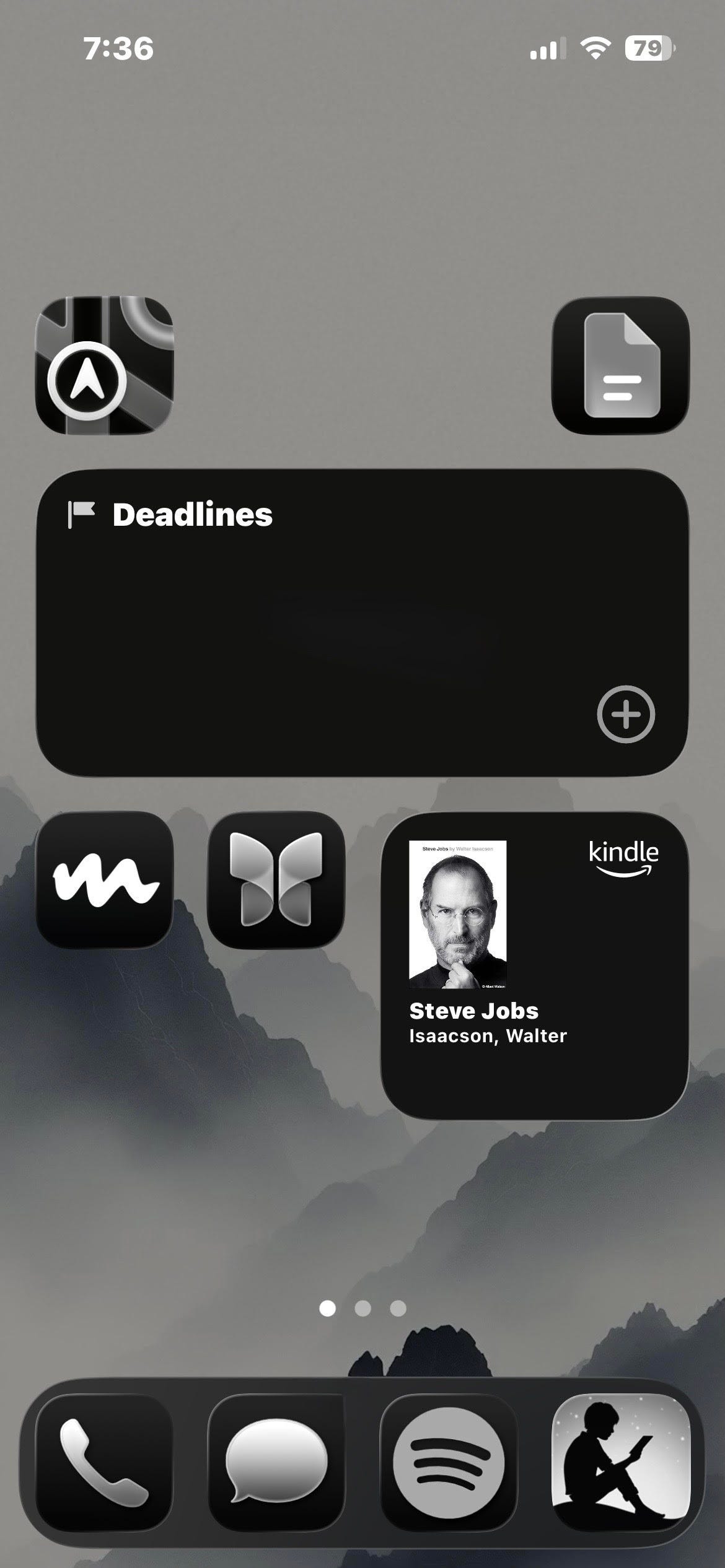
Simple layout. Plain background. Minimal icons. A reminders widget showing my current to-do list. A bookmark widget to jump directly back to my current page of whatever book I was last reading. (syncs with my E-reader to easily handoff into the offline world)
The other pages of my home screen have functional items like: a calendar widget. A shortcut to my notes app with a shared family grocery list. I have my writing apps and documents saved locally. Offline Maps downloaded on device for easy navigation.
There are no social apps. No entertainment apps filling idle space. When I pick up the phone, the first things I see are my tasks and my current book.
The phone encourages work and reading before I ever make a single decision.
What I kept
Everything that helps me actually live and work.
Writing. Email. Notes. Substack. Messages. Maps. Camera. Books downloaded locally. Music downloaded locally. Reminders. Podcasts. The tools that help me create, communicate, and navigate.
Digital minimalism is not about making your phone useless. Thirty minutes working on something that matters and thirty minutes disappearing into a feed are both thirty minutes of screen time. They are not the same thirty minutes of your life.
Offline Toolbox
Once I removed what was consuming my attention, I started filling that space with things that actually make the device more useful in the physical world, the offline world.
A modern smartphone can carry maps, books, medical information, survival references, identification tools, local AI, emergency information, and huge libraries of human knowledge without needing a connection at all.
That’s the side of modern technology I want more of.
Here are some useful apps to check out:
Apps:
KiwiX - Download and view massive libraries of web content—like Wikipedia, Project Gutenberg books, and TED Talks—completely offline without an internet connection
Locally AI by LM Studio - Offline AI. Different LLMs and virtual assistants you can download and run 100% locally on your device and access without any internet connection.
Organic Maps - Offline Maps, hiking trails, cycling routes, subway lines
Seek by iNaturalist - Uses image recognition technology to let you point your phone’s camera at plants, animals, fungi, birds, and amphibians to identify them in real time.
SAS Survival - Full SAS Wilderness and Survival Guide with photos and videos downloaded locally as an app.
First Aid: American Red Cross - Instant access to expert advice and step-by-step instructions for everyday medical emergencies.
Ward: Bunkers & Prep Alerts - See emergency shelters and bunkers in your area. Offline shelter maps. Get emergency alerts for your city or area. Be notified of hazards or natural disasters. Download hazard guides for different emergencies onto your device. Emergency supplies checklists.

These apps allow your phone to become immensely more useful in The Offline World. — On airplanes, in the woods, or on a cruise ship in the middle of the ocean.
Even without service or an internet connection,
Even if AI takes over the internet, the whole World Wide Web goes offline, or if everything loses power,
you still have an enormous amount of useful information available.
*Just don’t forget to have a backup solar charger for your greater devices. ☀️
The point
Every app you install, every notification you allow, every setting you leave at default is giving something direct access to your attention. Your attention becomes your time. Your time becomes your life.
Be intentional about how you spend it.
I did not make my phone less capable.
I made it more capable of helping me accomplish my tasks, reach my goals, and become who I actually want to be.
That is a greater phone.
Log off, spread love, be greater.
– [gf]
📡 [ end transmission. ]